Ask AI About Your Books Without Exposing Clients
How AccountGo's read-only AI accounting assistant answers questions about your books while keeping client, vendor, and bank details inside your workspace.
When a business owner or bookkeeper opens an AI accounting assistant inside their books, they usually ask practical questions: Which invoices are overdue right now? Why did expenses jump last month? What is still unreconciled in my bank register?
Answering those questions requires live access to your workspace. At the same time, your books hold private client and vendor names, email addresses, tax IDs, bank details, and invoice memos. AccountGo pairs its double-entry accounting engine with Anter AI so you can get answers about your numbers without handing raw personal details or editing power to an external AI model.
In plain terms: The AccountGo assistant is read-only—it can look up your books and explain your numbers, but it cannot change your ledger or post entries. It only sees what your account is allowed to see. Before any workspace record leaves AccountGo, client, vendor, bank, and team names are swapped for temporary codes, memos are hidden, and contact or tax details are masked. Your browser swaps the real names back on screen for you.
See the Assistant in Action
In this local example, we ask AccountGo Assistant to summarize the latest invoice and its payment. The assistant looks up a fictional $1,000 invoice, identifies the client, and reports that the payment was made in full with $0 remaining. The workspace and its records are sample data; the video is silent.
The client name shown in the answer comes from the workspace and is restored in the browser. The video shows the chat experience; the sections below explain the privacy controls behind it. Text you type into chat is sent as written, so avoid entering sensitive identifiers in your question.
Why Accounting Needs Stronger AI Boundaries
Most quick AI integrations fall into one of two traps:
- Over-broad access: Giving an external AI service a master key or a long-lived user token makes it hard to keep workspaces isolated and means access can linger even after a team member's role changes.
- All-or-nothing redaction: Sending raw names and emails to an AI model exposes private business relationships. On the other hand, replacing every name with
[REDACTED]breaks financial reasoning—the model can no longer tell whether three overdue invoices belong to one client or three different ones.
AccountGo and Anter AI were designed together to avoid both traps: keeping workspace permissions live and replacing real names with temporary session codes that preserve structure without exposing identities.
What Happens When You Attach or Scan Documents
AccountGo handles documents in two distinct ways, depending on which feature you use:
- Files attached to the assistant: When you attach a document to the assistant, the original file and its raw text stay inside AccountGo. AccountGo parses the document on its own server, purges the original file bytes upon acceptance, masks account-like numbers, replaces extracted entity names with temporary session codes, and sends only that masked, pseudonymized summary inside an untrusted-data boundary.
- Opt-in AI field reading: Separately, a workspace Owner can opt in to AI field reading, which sends a scanned receipt, bill, or invoice's text—with account-like numbers masked—to Anter to suggest field values. It is off by default, requires Owner consent, excludes bank-detail documents and your workspace's client/vendor directory, and saves nothing until you review and accept the document.
Honest Boundaries: What Reaches the AI (and What Does Not)
Clear security communication means stating boundaries plainly:
- What the external AI model sees: Your typed question, accounting amounts, currencies, dates, document numbers, document statuses, non-bank chart-of-accounts names (scrubbed for accidental email, phone, or long-number patterns), and temporary session codes (
C-,V-,B-,P-). If a workspace Owner turns on optional AI field reading, scanned receipt/bill/invoice text (with account-like numbers masked) is also sent to suggest fields. - What stays inside AccountGo: Customer, vendor, bank, and member names from workspace records; emails, phone numbers, street addresses, and tax IDs; raw bank and card numbers; free-text memos, notes, and descriptions; raw files attached to the assistant; and all provider API keys or caller assertions.
- Your prompt text still matters: Text you type into the chat is sent and stored as written, so avoid pasting passwords, full bank account numbers, or tax IDs directly into messages.
- Deterministic books first: The assistant is read-only. Creating invoices, recording bills, and posting journal entries stay inside AccountGo's deterministic accounting engine so your general ledger remains balanced and under human control.
For full feature-level disclosures, see our AI Feature Disclosure.
For Technical Evaluators
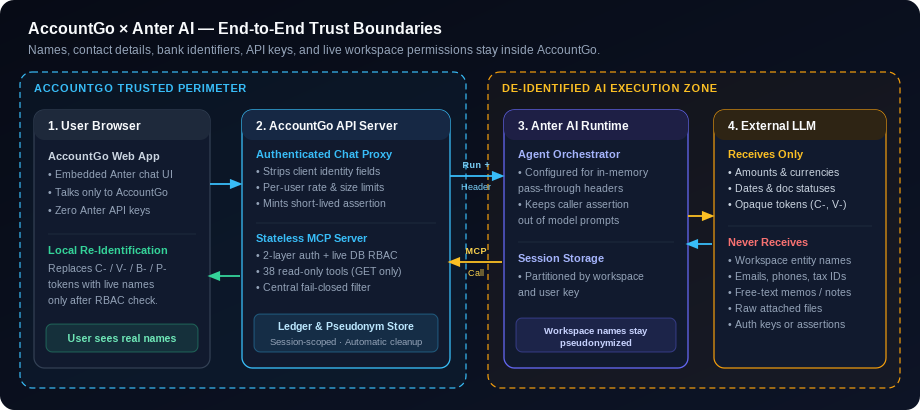
The sections below walk through the architecture behind those boundaries—covering the proxy boundary, two-layer Model Context Protocol (MCP) pass-through, fail-closed data classification, and browser-only re-identification.
1. Thin-Client Proxy Boundary
The assistant UI inside AccountGo uses Anter's embedded chat interface, but your browser does not talk directly to Anter AI and does not receive an Anter API key.
Every request—sending a message, listing sessions, resuming a stream, or cancelling a run—travels strictly to AccountGo's authenticated API proxy. On the server, AccountGo:
- Owns all identity and plan context: Any identity, workspace, role, or subscription fields supplied by the client are stripped and overwritten from the authenticated session and live subscription record.
- Partitions chat history: Sessions are scoped to a strict
(workspace, user)pair so conversations stay isolated across workspaces and teammates. - Applies abuse and error guardrails: Per-user rate limits and request-size caps bound traffic, and upstream provider errors are masked so internal infrastructure details do not leak to the browser.
2. Two-Layer MCP Pass-Through & Live Workspace Permissions
AccountGo exposes workspace data through a stateless Model Context Protocol (MCP) server. Instead of granting Anter a master key that can read any workspace, authentication is split into two layers:
- Transport gate: Anter connects to AccountGo's MCP endpoint using a server-level transport key checked in constant time. That key authorizes tool discovery, but carries no user identity and no workspace context—it cannot read business records on its own.
- Per-run caller assertion: For each assistant run, AccountGo mints a short-lived, cryptographically signed caller assertion bound to the active user, workspace, and session, and sends it through a dedicated pass-through header channel.
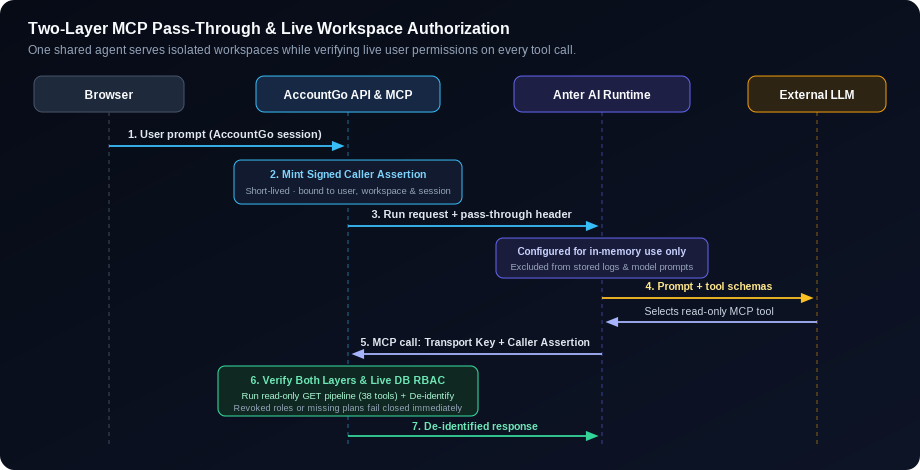
In our integration setup, Anter is configured to hold the pass-through assertion in process memory for the active run only, keep it out of stored run metadata and model prompts, and forward it alongside—not in place of—the transport key.
On every MCP tool call, AccountGo validates both layers, confirms the user account is active, and loads the caller's live workspace membership, role, and permissions directly from the database—so role changes or revocations take effect immediately. All 38 MCP tools across 6 domains (Financial Statements, Workspace & Ledger, Sales, Purchasing, Banking, and Review & Audit) execute in-process through AccountGo's existing read-only (GET) API pipeline, reusing the exact same module, plan, and Role-Based Access Control (RBAC) filters as the web application. Write endpoints are structurally unreachable from the MCP layer.
3. Fail-Closed Data Privacy Guard
De-identification is enforced centrally rather than left to individual tools:
- Pre-serialization stripping: Raw bank account numbers, routing numbers, IBANs, SWIFT/BIC codes, and card numbers are removed from tool payloads before serialization.
- Central fail-closed MCP filter: A global filter intercepts every tool response before it leaves AccountGo. Every string field is matched against an explicit classification registry, and any unclassified field defaults to
[masked]—so newly added API fields fail closed until explicitly reviewed.
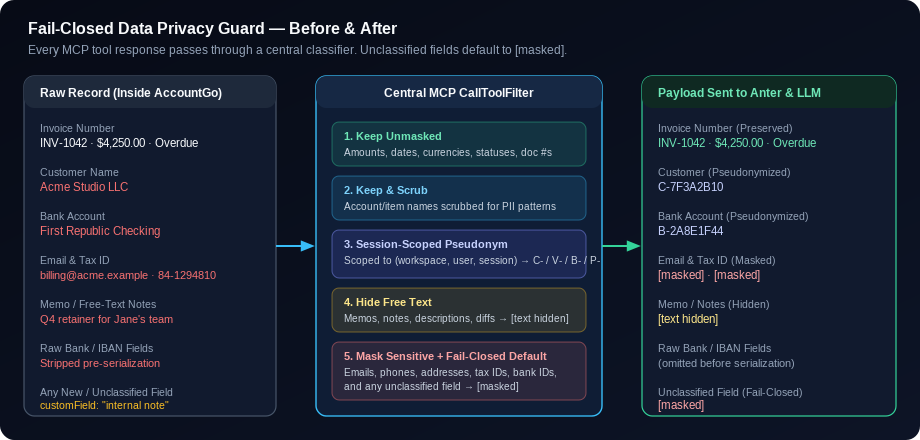
| Data Category | Disposition | Example Sent to Anter & LLM | Why |
|---|---|---|---|
| Amounts, currencies, dates, statuses, document numbers | Keep unmasked | INV-1042, $4,250.00, Overdue | Required for accurate financial analysis and reconciliation questions |
| Non-bank chart of accounts, product/service & tax rate names | Keep & scrub | Consulting Revenue (any embedded emails, phones, IBANs, or long numbers become [masked]) | Lets the model explain P&L and invoice structure without leaking accidental PII |
| Customers, vendors, banks, people & audit actors | Session pseudonym | C-7F3A2B10, V-9D1C4E02, B-2A8E1F44, P-4E19C08A | Preserves entity relationships within a conversation without revealing real names |
| Memos, notes, descriptions, comments, audit diffs | Hide free text | [text hidden] | Free-form text frequently contains private client details |
| Emails, phones, addresses, websites, tax IDs, bank/card IDs | Mask sensitive | [masked] | Sensitive identifiers are not needed for ledger reasoning |
| Any unclassified string field | Fail-closed default | [masked] | Prevents accidental exposure when schemas evolve |
Session-Scoped Pseudonyms & Minimal Retention
Each entity pseudonym (C-, V-, B-, P-) is derived per (workspace, user, session):
- Consistent within a conversation: The same client receives the same token across invoices, receipts, and follow-up questions in that session, allowing accurate grouping and totals.
- Unlinkable across sessions and users: The same client receives a different token in another session, for another teammate, or in another workspace.
- Minimal retention: For workspace records, AccountGo stores only the token mapping to an internal entity reference; standalone names with no backing workspace record (such as names read from an attached document) are stored in plaintext temporarily until automatic cleanup removes expired mappings on a rolling retention schedule.
4. Pseudonym Round-Trip & Browser-Only Re-Identification
To keep the assistant natural without sending real names to Anter, AccountGo closes the loop on both sides:
- Follow-up tool queries: The model can pass a pseudonym such as
C-7F3A2B10back as a tool filter argument. AccountGo resolves it strictly within the caller's(workspace, user, session)scope, runs the read-only query, and re-runs the privacy filter on the response. - Live browser re-identification: As replies stream back to the browser, AccountGo's web client buffers partial token prefixes across network chunks and resolves them via AccountGo's re-identification endpoint—which re-checks live RBAC permissions for each entity type before returning any real name.
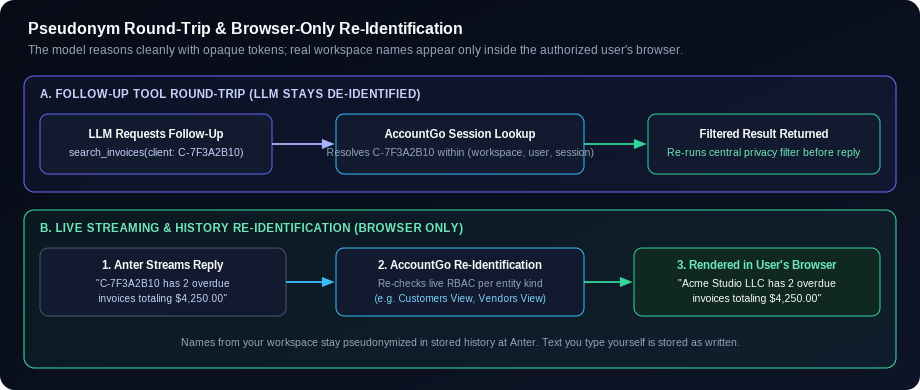
When you reopen an older chat, the same batched re-identification runs on load. Names that came from your workspace stay pseudonymized in the history stored at Anter. Text you type yourself is stored as written.
Try AccountGo Free
AI should help you understand your cash flow, spot overdue invoices, and prepare for month-end—without asking you to trade away workspace isolation, role permissions, or client privacy.
AccountGo's Free tier includes 30 AI calls per month with no credit card required—Create your workspace to try it on your own books, or explore Invoicing & Bills, Accounting, and the AccountGo Documentation.